You want to start developing with PHP and MySQL, but you don't want to mess around with installation of Apache, MySQL server, dealing with hosting companies etc.?
There is a way. And this way leads to the clouds! :)
You can develop and deploy your application within 5-10 minutes.
This tutorial can be used by beginners and advanced users.
All you need is just a web browser! :)
I have created a YouTube Tutorial as well. It describes the same steps and it is only 15 minutes long. So in 15 minutes or less you can have an application up and running without the troubles of installing a development stack.
The key is a cloud IDE called "Codenvy". It allows you to create your app within seconds and Deploy it to a lot of existing "Platform as a Service", In this tutorial I will show how to do so with "AppFog". You can use not only MySQL but mongoDb, Redis etc. And you can develop not only PHP applications, but Java, Ruby etc.
All these steps can be executed from almost every computer or device in the planet that can run a web browser. You are free to use different computers, operating systems, browsers. Your development stacks and projects are always with you. And you can deploy your applications with a click of a button. :)
We are going to use 2 applications. Don't worry they are created with a click of a button. One of them is our real application. Another is temporary used just to deploy phpMyAdmin to be able to manage our MySQL service on AppFog. You can delete it from the IDE (Codenvy) after the deployment is done if you wish. :)
I have made a lot of screenshots. But don't worry! They are here not to confuse you, by explaining difficult concepts, but to make it easier for you, showing every simple dummy step. Also you can run them as a slideshow and even don't have to read the text in the post.
1) Go to https://codenvy.com/ . Login or register. They support OpenID so you can login with github or google account.
2)You can start from scratch or if you already have a project in Codenvy you can open it. In this tutorial I will assume you are starting from scratch and you want to use PHP and MySQL
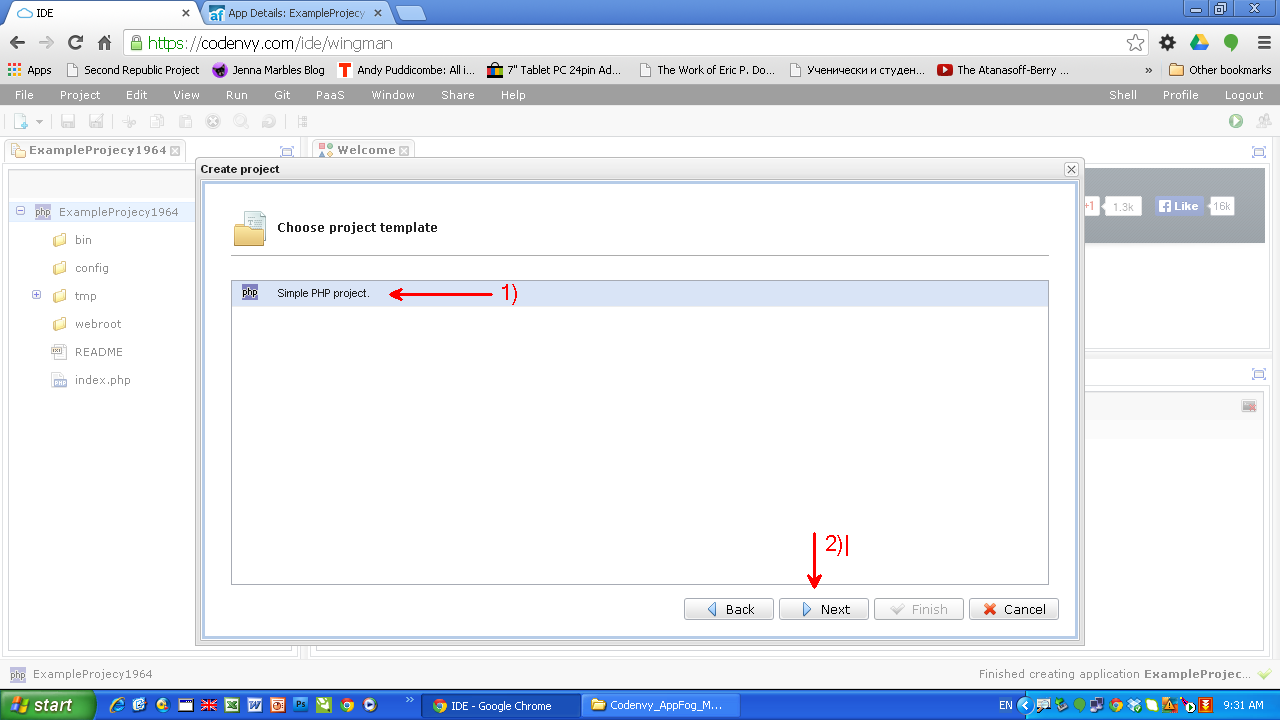
3) Give a name to the project. Choose the technology. It is PHP in our case. Choose the deployment platform. I am going to use AppFog as a PaaS. It is very good one. You application will become available online for a seconds. And you can choose from many DB services: MySQL, MongoDB, Redis etc.
4) Login with your AppFog username.password or go to https://www.appfog.com/, register and get an account.
5) Select the infrastructure. AppFog has 4 infrastructures at the moment (AWS Asia Southeast, AWS Europe West, AWS US East, HP Openstack AZ 2). Select the infrastructure according to your customers.
6) And you are Done! :). Your "Hello World!" PHP application is up and running. It is also available to your customers to access it. But don't you worry. Only the people who know the URL can access it.
7) You are in charge. You have full control over the instance of your application directly from Codenvy
8) It is time to run a DB service on the infrastructure if you need one. You can do it directly from the IDE (Codenvy) or go to appfog.com and do it from their interface.
9) Lets do it from the AppFog interface (dashboard). Login to AppFog.
10) Find your running application. As you can see you have a full control.
11) Select "Services", because we want to use a MySQL service in our PHP application.
12) We have the service up and running, ready to be used in our PHP app.
13) But we want to be ablle to mange the DB server (MySQL) add, delete tables etc. We can achieve this using tunneling. But this requires installing software etc. There is an easier way, by using phpMyAdmin. So lets deploy and run an instance of phpMyAdmin on the same Infrastructure and manage the MySQL service. In order to do so we are using again Codenvy. It is extremely easy to deploy apps from the cloud IDE.
Start by creating a new Project in Codenvy which we will use to Deploy phpMyAdmin to AppFog infrastructure.
14) phpMyAdmin is a PHP application. This is the reason we start again with creating a PHP project and choose to deplaoy to the same PaaS (AppFog) on the same infrastructure as our running MySQL service
15) Check if your second app is running on AppFog.
16) We don't need any of the files from a Codenvy "Hello World" PHP app, so lets delete them.
17) We are going to use GitHub to pull the right version of phpMyAdmin from https://github.com/appfog. This is a modified version of phpMyAdmin. Notice we are not downloading the original version of phpMyAdmin.
18) Go to https://github.com/appfog and find phpMyAdmin there
19) Copy the address of the repo.
20) Add the remote repository address. This is the address of phpMyAdmin https://github.com/appfog/af-php-myadmin
21) Pull the phpMyAdmin from the repo.
22) Deploy the phpMyAdmin to AppFog
23) Try to see if it has been deployed. It is there, but we have to do configuration before we start using it.
24) Go to AppFog and find the project from our phpMyAdmin.
25) Bind the running MySQL service to our phpMyAdmin application. We are going to manage the service with this phpMyAdmin.
26) Set up the password for our phpMyAdmin instance. In order to do so, we have to set an Environment Variable for our phpMyAdmin app in AppFog. Go to Env variables tab and enter PMA_PASSWORD to whatever password you want to use to access your phpMyAdmin.
27) After having completed the previous steps you can refresh the page with your phpMyAdmin instance to enter your username/password
28) As a username use your AppFog username (it is an email address) and as a password use the password you have set in the Environment Variable PMA_PASSWORD. You can change the username as well. All you have to do is set another variable PMA_USERNAME with the desired value and in this case when you login to your phpMyAdmin instance instead of using your AppFog username you can use the username you have set up with the variable PMA_USERNAME
29) Congratulations! You have setup your instance of phpMyAdmin. You can create, drop tables etc. You are in charge.
30) You can go back to your original application now in Codenvy. You can delete from your IDE (Codenvy) the extra application we have created for phpMyAdmin. Or you can keep it there. :)
31) There is one more thing. How to connect from our app to the MySQL server? All the connection information is in an Environment Variable called VCAP_SERVICES. It is a JSON object. So you can convert it to an PHP array and get the username, password, database name etc. for your MySQL instance. You can find an example code on how to parse and use the values in pastebin.com
32) You are in charge of your running application on AppFog and the services. You can Stop, Start, Remove etc. the instance of your application or you can manage the services directly from Codenvy if you like.
33) In order to remove the service you can go to AppFog and do it from their interface.
I hope you enjoyed the tutorial! If you find it useful share, comment and like.
Have fun! :)
Tuesday, December 3, 2013
Friday, November 22, 2013
ZF2 modules project "coolcsn". Git branching model. Semantic Versioning.
Our ZF2 modules project "coolcsn" starts to take off. Its goal is to provide the community with reusable FZ2 modules, which allow everyone to build a CMS/Blogging, e-commerce etc. within 5 minutes.
There is a YouTube tutorial on the same topic I am discussing here in this blog post "ZF2 modules coolcsn. Git branching model. Semantic Versioning. How to use or participate?". There you can see how the 2 Git branching models can be implemented.
"Joomla" and "WordPress" are very good examples of CMS/Blogging solutions. But we want to have behind the flexability and power of Zend Frameowrk 2.
We are building the modules with students. They constantly come and go. We have to offer a really simple Git branching model for people which almost don't know what SCM system is.
All we want is to code. Git is a tool. It should stay out of the way. It should be transparent.
When I want to take shower I don't want to know how the boiler works. All I want is simply to take a shower.
I am coming from the world of SVN. It did its job for us. It was transparent.
The last years I switched to Git. We are using it for all our projects. It offers a lot. But sometimes "more is less". There is " The paradox of choice". More choices you have, more time you have to spent on making choices and less time to do your real job and enjoy the life.
Since the branches in Git are so cheap how can we take advantage of that? We have to figure out a branching model for our projects.
The first one was "A successful Git branching model". I love it because instead of inventing everything from scratch the solution was given to us.
The people don't like to "rethink". They don't like to think at all. Thinking requires energy and time.
"A successful Git branching model" is robust and obviously works. Many people left positive comments in Internet. But many try to find simpler solutions.
Also I think this model is good for well established professional software teams. We are looking for something that doesn't have to be explained and doesn't require thinking, time and knowledge at all. "Less is more"!
Also our project is Open Source. Many people should be able to just, fork, code and send PR (Pull Request). This is the reason, I think having, only one branch in the public repository (master) will make the think easier.
I came across a branching model suitable for PHP, OSS, composer projects "Git branching model". It works very well with "composer" as well. And it is relatively new. The post is from October 21, 2013.
I like it because it is simpler. It uses master branch for development and the tags for releases. I still have some questions, but the model looks good.
What bothers me is the fact that master branch means 2 things. "But 'latest' can mean one of two things. Either it is the development of a yet unreleased version. Such as 1.1-dev which will eventually become v1.1.0. Or alternatively there could already be a release on 1.1, and this would be the development of the next release, such as v1.1.1." What it is finally? How can you tell?
In any case I like it because unlike "A successful Git branching model", "Git branching model" uses master for actual development.
In "A successful Git branching model" master branch is used only for releases. In fact each commit in the master branch represents a release, together with a tag.
The people who try to improve "A successful Git branching model" usually reduce the number of the branches.
In "Git branching model" for each minor release we have to have a branch. I guess it should be in the origin repository. That means we can end up having a lot of release branches in "origin" repository. But it makes sense to have publicly available branches for the releases because in OSS many different people, which don't know each other, will work on the release.
There is a very interesting post "What git branching models actually work?". The guy has done a good research.
The version of the release is another interesting question. But we have a much clear answer to it. I like standards. They allow me to think less. They don't give me too many choices. Another words they give me more. Fortunately there is a standard for the versions of the releases. "Semantic Versioning 2.0.0" is the standard. It is clear and simple. We will follow it.
It seem so me Zend Framework team is using "A successful Git branching model". If you look their repository you will see 2 branching living together int he origin repository - "master" and "develop". This is what suggests "A successful Git branching model"
It is hard to say what git model zf-common implements. Each module usually has only master branch and tags representing different releases. Many don't even have tags. I like this simplicity.
Summary :
I would say, lets have only "master" branch in the "origin" repository for each CSN module. For each release we will have a tag. The "Semantic Versioning 2.0.0" will determent the version of the release.
If there is a need to create branches for different releases we will implement "Git branching model".
If we have a dedicated team in the future we can implement "A successful Git branching model".
There is a YouTube tutorial on the same topic I am discussing here in this blog post "ZF2 modules coolcsn. Git branching model. Semantic Versioning. How to use or participate?". There you can see how the 2 Git branching models can be implemented.
"Joomla" and "WordPress" are very good examples of CMS/Blogging solutions. But we want to have behind the flexability and power of Zend Frameowrk 2.
We are building the modules with students. They constantly come and go. We have to offer a really simple Git branching model for people which almost don't know what SCM system is.
All we want is to code. Git is a tool. It should stay out of the way. It should be transparent.
When I want to take shower I don't want to know how the boiler works. All I want is simply to take a shower.
I am coming from the world of SVN. It did its job for us. It was transparent.
The last years I switched to Git. We are using it for all our projects. It offers a lot. But sometimes "more is less". There is " The paradox of choice". More choices you have, more time you have to spent on making choices and less time to do your real job and enjoy the life.
Since the branches in Git are so cheap how can we take advantage of that? We have to figure out a branching model for our projects.
The first one was "A successful Git branching model". I love it because instead of inventing everything from scratch the solution was given to us.
The people don't like to "rethink". They don't like to think at all. Thinking requires energy and time.
"A successful Git branching model" is robust and obviously works. Many people left positive comments in Internet. But many try to find simpler solutions.
Also I think this model is good for well established professional software teams. We are looking for something that doesn't have to be explained and doesn't require thinking, time and knowledge at all. "Less is more"!
Also our project is Open Source. Many people should be able to just, fork, code and send PR (Pull Request). This is the reason, I think having, only one branch in the public repository (master) will make the think easier.
I came across a branching model suitable for PHP, OSS, composer projects "Git branching model". It works very well with "composer" as well. And it is relatively new. The post is from October 21, 2013.
I like it because it is simpler. It uses master branch for development and the tags for releases. I still have some questions, but the model looks good.
What bothers me is the fact that master branch means 2 things. "But 'latest' can mean one of two things. Either it is the development of a yet unreleased version. Such as 1.1-dev which will eventually become v1.1.0. Or alternatively there could already be a release on 1.1, and this would be the development of the next release, such as v1.1.1." What it is finally? How can you tell?
In any case I like it because unlike "A successful Git branching model", "Git branching model" uses master for actual development.
In "A successful Git branching model" master branch is used only for releases. In fact each commit in the master branch represents a release, together with a tag.
The people who try to improve "A successful Git branching model" usually reduce the number of the branches.
In "Git branching model" for each minor release we have to have a branch. I guess it should be in the origin repository. That means we can end up having a lot of release branches in "origin" repository. But it makes sense to have publicly available branches for the releases because in OSS many different people, which don't know each other, will work on the release.
There is a very interesting post "What git branching models actually work?". The guy has done a good research.
The version of the release is another interesting question. But we have a much clear answer to it. I like standards. They allow me to think less. They don't give me too many choices. Another words they give me more. Fortunately there is a standard for the versions of the releases. "Semantic Versioning 2.0.0" is the standard. It is clear and simple. We will follow it.
It seem so me Zend Framework team is using "A successful Git branching model". If you look their repository you will see 2 branching living together int he origin repository - "master" and "develop". This is what suggests "A successful Git branching model"
It is hard to say what git model zf-common implements. Each module usually has only master branch and tags representing different releases. Many don't even have tags. I like this simplicity.
Summary :
I would say, lets have only "master" branch in the "origin" repository for each CSN module. For each release we will have a tag. The "Semantic Versioning 2.0.0" will determent the version of the release.
If there is a need to create branches for different releases we will implement "Git branching model".
If we have a dedicated team in the future we can implement "A successful Git branching model".
Subscribe to:
Posts (Atom)